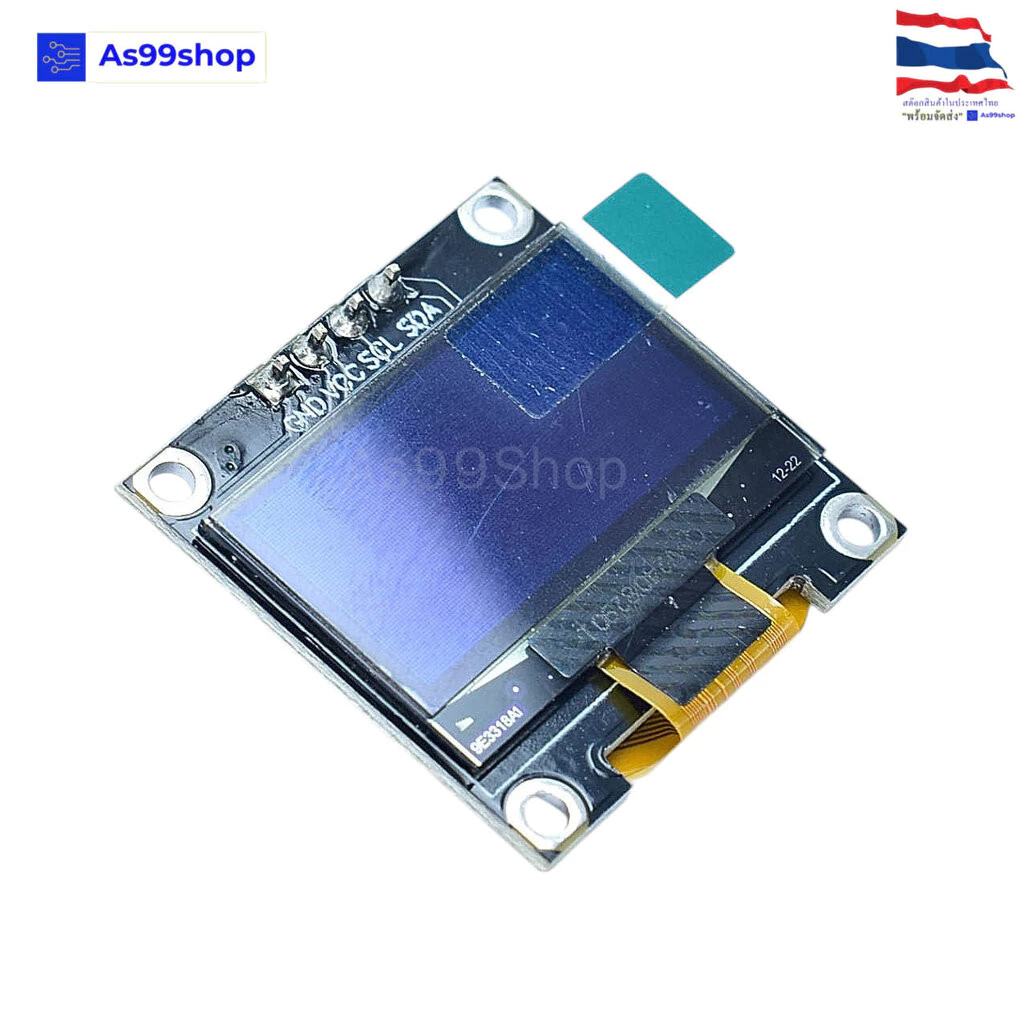
จอแสดงผล OLED ขนาด 0.96 นิ้ว แบบ I2C สีขาว
4.8ขายแล้ว 12 26
฿65
ราคาอาจเปลี่ยนแปลง ตรวจสอบราคาล่าสุดที่ Shopee
แชร์:
ช็อป99
คะแนนร้าน 4.9
- แบรนด์
- NoBrand
- หมวดหมู่
- Home & Living › Bathrooms › Toilet Bowls, Seats & Covers
- คงเหลือ
- 141 ชิ้น
รายละเอียดสินค้า
จอแสดงผล OLED ขนาด 0.96 นิ้ว แบบ I2C สีขาว ; OLED Display I2C Module 0.96 inch (128x64 pixel "White) 3.3-5Volt Driver SSD1306 รุ่นที่ใช้ทดสอบ Uno-R3,Nano v3 ,Esp8266 NodeMcu
**driver อาจมีการเปลี่ยนแปลง**
specification :
- Needn't backlight, the display unit can self-luminous
- High resolution: 128 * 64
- Viewing angle: 160
- Supports many control chip: Fully compatible with Arduino, 51 Series, MSP430 Series, STM32 / 2, CSR IC, etc.
- Ultra-low power consumption: full screen lit 0.08W
- Voltage: 3V ~ 5V DC
- Working Temperature: -30 ? ~ 70 ?
- Module Size: 27.0MM * 27.0MM * 4.1MM
- I2C/IIC Interface, need 2 IO only.
- Driver IC: SSD1306
- white color
- I2C address 0x3C
ติดตั้ง library ก่อนใช้งาน
Adafruit display library:https://github.com/adafruit/Adafruit_SSD1306
Adafruit GFX library: https://github.com/adafruit/Adafruit-GFX-Library
เมื่อติดตั้ง library แล้วต้องแก้ไขไฟล์ ตามขนาดของ OLED
ต่อวงจรตามรูป
Code:ทดสอบข้อความ
/*
Arduino with Test OLED module white SSD1306 driver I2C
High resolution: 12864 pixel
For complete project details, visit:Arduinoshop99
*/
#include "Wire.h"
#include "Adafruit_GFX.h"
#include "Adafruit_SSD1306.h"
#include "Fonts/FreeMonoBoldOblique9pt7b.h" //include font FreeMonoBoldOblique9pt7b.h
Adafruit_SSD1306 OLED(-1);
void setup() {
OLED.setFont(FreeMonoBoldOblique9pt7b); // Use font from file include
OLED.begin(SSD1306_SWITCHCAPVCC,0x3C); // initialize with the I2C addr 0x3C (for the 128x64)
}
void loop(){
OLED.clearDisplay();
OLED.setTextColor(WHITE); //Text is white ,background is black
OLED.setTextSize(1);
OLED.setCursor(0,11);
OLED.println("OLED 128x64");
OLED.drawLine(0, 15, 127,15, WHITE);
OLED.setCursor(0,30);
OLED.println("Arduino....");
OLED.setCursor(15,55);
OLED.println("Shop");
OLED.setTextSize(2);
OLED.setCursor(0,59);
OLED.println(" 99");
OLED.drawLine(0, 63, 127,63, WHITE);
OLED.display(); //
delay(200);
}
หรือแบบที่ 2 ใช้ U8g2 new
ติดตั้ง library ก่อนใช้งาน U8g2 library: https://github.com/SGBotic/U8g2_Arduino
#include "U8g2lib.h" #include "Wire.h" U8G2_SSD1306_128X64_NONAME_F_HW_I2C u8g2(U8G2_R0, /* reset=*/ U8X8_PIN_NONE); void setup(void) { u8g2.begin(); } void loop(void) { u8g2.firstPage(); do { u8g2.setFont(u8g2_font_ncenB10_tr); u8g2.drawLine(1, 28, 127, 28); u8g2.drawRFrame(1,1,127,63,1); u8g2.drawStr(10,22,"OLED 1.3 inch"); u8g2.drawStr(20,43,"128*64 pixel"); u8g2.drawStr(5,60,"ArduinoShop99"); } while ( u8g2.nextPage() ); }







![[ราคาส่วนลด ถูกที่สุด] ที่วางแปรงสีฟัน หมีน้อย (แก้วใส่แปรงสีฟัน/ถ้วยหมีน่ารัก) - ติดผนัง ชั้นวางของห้องน้ำ G2729](https://cf.shopee.co.th/file/th-11134207-81zti-me9gq4ktlclcef_tn.webp)