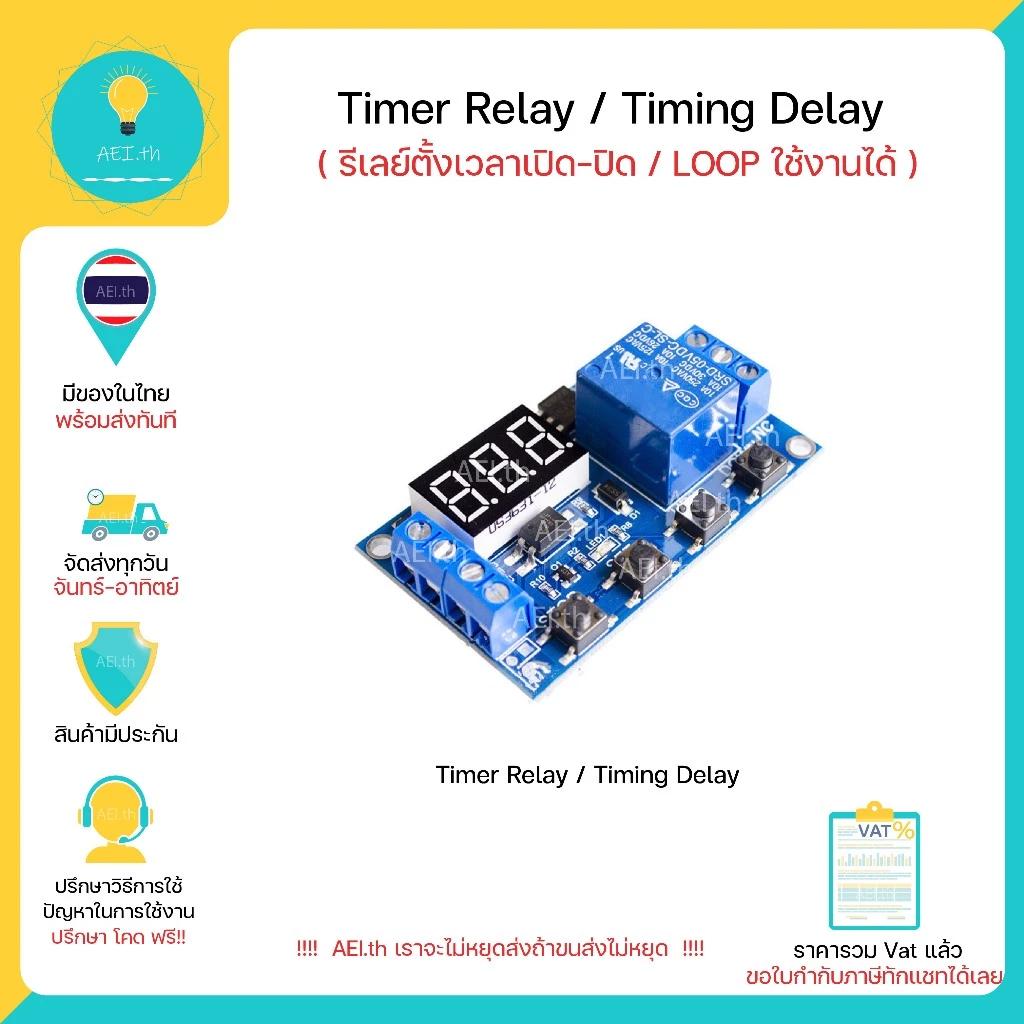
Timer relay timing delay Relay Timer รีเลย์ตั้งเวลาได้ มีของในไทย มีเก็บเงินปลายทาง พร้อมส่งทันที !!!
4.9ขายแล้ว 71 234
฿55
ราคาอาจเปลี่ยนแปลง ตรวจสอบราคาล่าสุดที่ Shopee
แชร์:
AEI.th
คะแนนร้าน 4.9
- แบรนด์
- NoBrand
- หมวดหมู่
- Computers & Accessories › Others
- คงเหลือ
- 50 ชิ้น
รายละเอียดสินค้า
🎉🎉บริษัทเราเป็น บริษัท/โรงงาน ผลิต นำเข้า OEM สินค้าประเภทนี้โดยเฉพาะ ลูกค้าสามารถมั่นใจในคุณภาพสินค้า และ บริการ รวมถึงมั่นใจได้ว่าคุ้มค่าที่สุดจากบริษัทเราได้ครับ🎉🎉
❤️❤️❤️❤️มีของในไทยพร้อมส่งทันที❤️❤️❤️❤️
👍👍👍สามารออก ใบเสร็จ/ใบกำกับภาษี(Vat) เต็มรูปแบบได้(แชทแจ้งรายละเอียดในใบกำกับภาษีที่ต้องการได้เลย)👍👍👍
👍👍👍👍มีเก็บเงินปลายทาง เพื่ออำนวยความสดวกกับลูกค้า👍👍👍👍
❤️❤️❤️❤️รับประกันสินค้ามีคุณภาพ 100% จากทางร้านค้า ❤️❤️❤️❤️
🙏🙏🙏🙏ถ้ามีปัญหาในการใช้งาน หรือ ต้องการปรึกษาสามารถทักเข้ามาได้เลยครับ ยินดีให้บริการครับผม🙏🙏🙏🙏
❤️❤️ AEI.th เราจะไม่หยุดส่งถ้าขนส่งไม่หยุด ❤️❤️
Relay Timer timing delay Timer relay รีเลย์ตั้งเวลาได้
**** ไม่มีโหมดจดจำการตั้งค่าหลังถอดไฟเลี้ยงออก ****
รายละเอียดสินค้า :
แรงดันทำงาน : 6.0V ~ 30V
รองรับ Micro USB 5V
โหมดการทำงาน :
OPE: relay closing time point, CLE: relay off time point
Time period: PE-1 ~ PE-5 5 time periods (OPE to CLE is a time period)
คำอธิบาย :
P-1: The relay closes or outputs pulses every day to the OPE time point, and the relay turns off or outputs pulses to the CLE time point.
P-2: set the day, to the OPE time point when the relay closed or output pulse, to the CLE time point when the relay disconnect / or output pulse
P-3: set the date of the month, to the OPE time point when the relay closed or output pulse, to the CLE time point when the relay is off or output pulse
P-4: Set the date 1 to date 2, start every day at the OPE time point, end to the CLE time point, relay action or output pulse
P-5: As with P-4, only the month can not be set
วิธีการตั้งค่าเวลา :
In the time to run the interface, press the DOWN button for a while:
Step 1: Select the time period: PE-1 ~ PE-5 Press UP and DOWN to select;
Step 2: Press the SET key to select the mode: P-1 ~ P-5 (Set this time period to the corresponding mode) by pressing the UP and DOWN keys. ("----" means to block this time period)
Note: Each time period can be repeated from the "----", P-1 ~ P-5 one of the optional; For example,you can let five time periods at the same time work in the P-1 mode, or let Time period 1 work in P-1 mode, time period 2 work in P-2 mode and so on.
Step 3: After the mode selection is finished, press the SET key to enter the time period setting interface, set the interface in the time period, press the SET key to switch the parameter, "OPE" start time point, "CLE" end point, "dAE" date information;
Step 4: After setting the parameters to exit the settings, press the SET button for 2 seconds to release, automatically check whether the parameter settings are legal, legal to save the parameters, return to the time to run the interface; if the parameter is wrong, "ERR" reminder (for example, stop time or Date <= start ti